How AI-Assisted UI Generation Accelerated a Premium WordPress Experience

Author
Parth ChopraPublished
May 10, 2026Reading Time
14 min read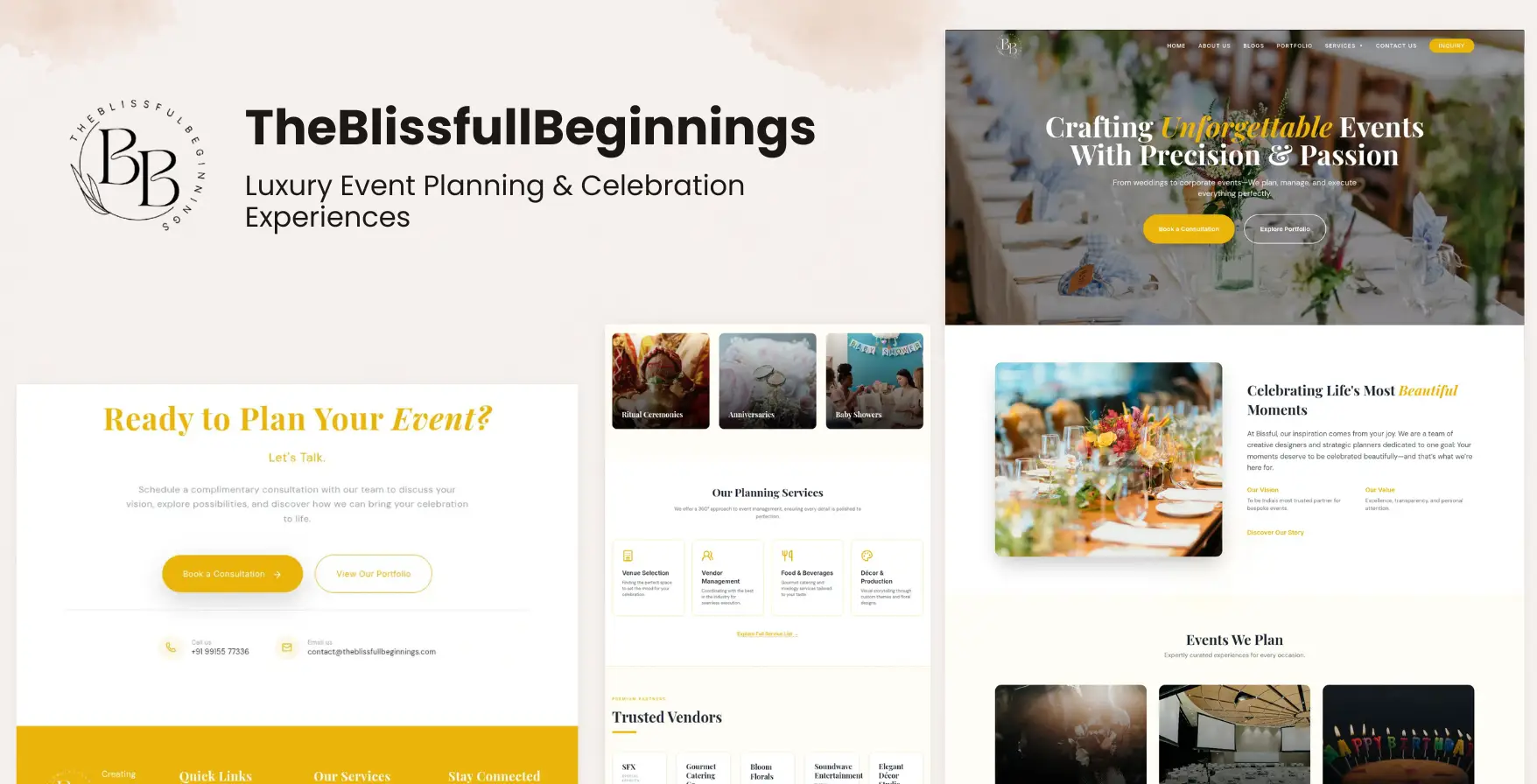
Introduction
Modern frontend delivery has changed materially over the last few years. Teams are no longer limited to a slow handoff chain where wireframes move to mockups, mockups move to tickets, and tickets move to implementation only after multiple rounds of interpretation. Design systems, component libraries, visual testing, and collaborative tooling already reduced much of that friction. The next shift is the rise of AI-assisted frontend development, where interface generation becomes part of the engineering workflow itself.
That shift matters because interface work is still expensive in a subtle way. Even when requirements are clear, teams lose time translating rough layout intent into realistic sections, experimenting with hierarchy, and exploring variants that may or may not survive to production. For premium digital experiences, especially those tied to visual brands, iteration quality can determine whether the final experience feels generic or intentional.
The Bissful / Blissfull Beginnings project was developed in that context. The goal was to build a premium WordPress experience for a luxury event-planning brand while compressing early-stage UI iteration. Instead of positioning AI as an autonomous web generator, the project treated AI as a workflow accelerator. AI UI generation helped move from wireframes to viable interface structures faster, while engineering decisions still governed responsiveness, accessibility, integration, performance, and production stability.
This distinction is important. The strongest results in AI-powered UI workflows do not come from replacing frontend engineering. They come from reducing the time between an idea and a testable interface, so engineers can spend more energy on the decisions that actually determine product quality.
The Problem With Traditional Frontend Iteration
Traditional frontend iteration is often slow for reasons that are easy to underestimate. A wireframe may communicate structure, but it rarely resolves spacing logic, responsive collapse behavior, typography rhythm, content weighting, animation hierarchy, or the micro-decisions that make a premium interface feel finished. By the time those issues surface, the team is already deep into implementation.
This creates a familiar bottleneck. Designers explore one tool, developers reconstruct the same idea in code, and stakeholders react only after a semi-functional version exists. If a landing section needs stronger emphasis, if an inquiry path feels too buried, or if the gallery composition does not match the brand tone, the team loops back through the same cycle again. The cost is not only schedule length. It is also creative drag.
For a luxury event brand, that drag is more visible. The interface needs to communicate elegance, trust, visual sophistication, and operational clarity at the same time. Generic themes can technically publish pages, but they often fail to create a distinct sense of arrival. They also make structured experimentation difficult, because many decisions are constrained by the theme rather than by the intended customer journey.
That was the real challenge here. We were not solving for a basic brochure site. We were solving for a premium WordPress experience that needed modern interaction quality, responsive reliability, scalable content management, and conversion-ready inquiry workflows. The team needed faster iteration, but not at the cost of engineering control.
Designing the Workflow
Before any generated UI entered the process, the workflow started with manual planning. This stage is where many teams make a mistake: they try to generate too early. Good frontend prototyping workflow design still begins with human decisions about page goals, audience behavior, and content hierarchy.
For Bissful, the planning stage focused on identifying the core journey: first impression, services positioning, proof through visual storytelling, trust-building content, and an inquiry path that felt premium rather than transactional. Each section had a job. Hero layouts needed to establish aspiration immediately. Supporting sections needed to balance emotional storytelling with clear service framing. Inquiry components had to feel lightweight enough for users to start the conversation without friction.
Page composition strategy mattered as much as copy direction. Rather than treating the site as a stack of interchangeable blocks, the structure was organized around cadence: visual intensity, breathing room, detail escalation, and conversion timing. That kind of layout rhythm cannot be delegated cleanly to a prompt unless the underlying intent is already clear.
Wireframe planning also made later AI outputs more useful. When the hierarchy, content priorities, and section responsibilities were already defined, generated UI had a narrower and more productive target. Instead of asking AI to invent the product, we asked it to accelerate the translation of a known product direction into candidate frontend structures.
Using AI for UI Generation
This is where the workflow gained speed. Google Gemini was used to turn planned layout concepts into rough UI structures that could be reviewed, compared, and refined quickly. In practice, this meant accelerating the most repetitive part of early frontend ideation: building section variations, adjusting composition patterns, and exploring how different content blocks might behave inside a premium visual system.
The value of Gemini UI generation was not that every generated section was production-ready. Most were not. The value was that the workflow produced materially faster visual starting points than hand-building every exploratory variant from scratch. That changed the economics of iteration. More options could be explored earlier, weak directions could be discarded sooner, and promising patterns could move into refinement with real momentum.
AI was especially effective in three areas. First, it accelerated section scaffolding. Hero compositions, feature bands, gallery layouts, and testimonial structures could be assembled quickly enough to compare hierarchy and pacing decisions without committing to a full implementation path. Second, it helped with visual experimentation. Alternate alignments, card densities, and section transitions could be tested rapidly, which is useful when trying to define a luxury visual tone. Third, it reduced the blank-canvas problem that often slows premium interface work.
But this is also where limits became obvious. Generated layouts frequently needed engineering cleanup. Spacing was inconsistent. Responsive behavior was often implied rather than solved. Animation ideas looked interesting conceptually but required restraint in production. Accessibility semantics needed to be reviewed manually. In other words, AI-assisted web design was useful precisely because it accelerated ideation, not because it removed the need for engineering.
That distinction shaped the entire workflow. AI accelerated layout exploration and section generation, while engineering ownership remained with the implementation layer. The final production quality still depended on deliberate frontend decisions, not automated output.
Engineering the Production Experience
Once promising UI directions were identified, the work shifted from generation to engineering. This is the phase where many AI-centered narratives become misleading, because the most difficult quality decisions often begin after the generated mockup looks convincing.
Frontend refinement focused first on responsiveness. Luxury interfaces usually rely on large imagery, asymmetrical spacing, layered decoration, and editorial content density. Those qualities can degrade quickly on smaller screens if the layout system is not carefully rebalanced. The implementation process had to define how sections collapsed, where visual elements were trimmed, how galleries stacked, and how inquiry pathways remained prominent across breakpoints.
Spacing systems were another major concern. Generated layouts often create local visual appeal without maintaining global rhythm. Production refinement required establishing more reliable spacing rules so that the site felt cohesive from hero to footer. Typography hierarchy, margin cadence, card padding, and section transitions all had to reinforce the same brand language.
Animation systems were handled with similar discipline. Premium interfaces benefit from motion, but motion only helps when it supports attention rather than competing for it. Reveal behaviors, section transitions, and decorative movement were tuned to preserve elegance without increasing interaction cost. This is a practical example of why WordPress frontend engineering still matters even when AI accelerates early composition. Performance and perception are both determined by implementation detail.
Accessibility also required explicit engineering decisions. Generated UI structures rarely arrive with complete semantic fidelity. Headings needed rational structure, interactive controls needed predictable states, contrast relationships had to be checked, and mobile behaviors had to remain usable under real browsing conditions. These are not optional refinements. They are part of what makes the difference between a concept and a production system.
Only after that refinement work did the interface become ready for platform integration. That sequence matters: generate, review, refine, then integrate. Reversing it creates unstable systems.
WordPress as a Production Platform
WordPress remained the production foundation because the project still needed operational usability, content flexibility, and a stable authoring environment. This is where the conversation around AI-generated interfaces often becomes shallow. A strong digital experience is not only the visible frontend. It is also the system that allows the business to run the experience over time.
For Bissful, WordPress provided a familiar and reliable CMS layer for service content, galleries, promotional updates, and inquiry handling. That mattered because luxury event platforms evolve constantly. Copy changes, portfolio updates, seasonal packages, campaign pages, and lead-handling workflows all need to be manageable without rebuilding the product each time.
The production theme architecture therefore had to do more than render attractive pages. It needed modular sections, maintainable template structures, plugin interoperability, and controlled customization pathways. AJAX-based inquiry workflows had to integrate cleanly. Content editing had to remain practical. Search-facing pages needed SEO-aware rendering. Assets needed to be delivered efficiently enough to preserve the premium perception created by the design.
This is why WordPress experience architecture is a more accurate description than simply calling the result a website. The platform combined visual presentation, lead operations, content management, and future extensibility into one system. AI could accelerate interface exploration, but WordPress engineering made the system operational.
Challenges During Implementation
Several challenges shaped the final implementation. The first was refining AI-generated layouts into production-grade sections. Generated structures often contained good visual ideas but weak system behavior. Cards looked balanced in isolation but broke rhythm when stacked. Decorative elements added tone but complicated mobile spacing. Interesting asymmetry sometimes created accessibility or responsiveness problems. Each promising section had to be normalized into a more repeatable frontend pattern.
The second challenge was responsive optimization. Luxury-brand sites often depend on oversized imagery and editorial composition, both of which can become fragile on mobile. The engineering process had to preserve mood without forcing heavy layouts or awkward content sequences on smaller screens. This required selective simplification, not just uniform scaling.
Plugin compatibility was another practical constraint. A modern WordPress build rarely exists in isolation. WooCommerce, contact systems, SEO plugins, builder utilities, and custom workflow logic all influence how the frontend behaves. Maintaining plugin interoperability without eroding the premium interface required careful boundary-setting between the theme, the content system, and plugin-rendered components.
Performance optimization also mattered. High-resolution visuals support the luxury brand position, but they can quickly undermine the experience if asset delivery is unmanaged. Image sizing, script discipline, transition cost, and render stability all needed attention so the interface felt polished instead of heavy.
Finally, the content system had to remain scalable. A premium landing page can be hand-tuned once, but a production platform has to survive updates, new sections, future campaigns, and changing service priorities. The implementation therefore emphasized reusable layout logic rather than one-off visual tricks.
Key Engineering Lessons
The project reinforced four lessons that apply broadly to AI-assisted frontend development.
First, AI works best as a workflow accelerator. It is extremely useful when the team already understands the product direction and wants to explore interface options faster. It is much less useful when the goal is to replace product thinking or production engineering.
Second, production systems still require engineering. Responsiveness, accessibility, CMS integration, animation restraint, asset optimization, and maintainability do not emerge automatically from generated UI. They require structured implementation decisions.
Third, modern frontend practices materially improve traditional CMS platforms. WordPress does not need to feel dated when the theme architecture, interaction systems, and content structures are treated as part of a modern frontend system rather than a template assembly exercise.
Fourth, structured UI systems improve scalability. Reusable spacing logic, modular sections, and utility-oriented styling reduce the long-term cost of change. That matters even more when AI is involved, because generated output becomes far more useful when it can be absorbed into a coherent system instead of into ad hoc page code.
Future of AI-Assisted Frontend Development
The future of this workflow is not full automation. It is better orchestration. Rapid frontend prototyping will continue to improve as AI models become more capable at interpreting layout intent, component patterns, and style direction. But the highest-value workflows will remain hybrid workflows.
In those hybrid systems, AI will generate faster first drafts, assist with variant exploration, and reduce repetitive scaffold work. Engineers will continue to define architecture, integrate business logic, enforce quality constraints, and translate interface experiments into stable production systems. Design systems will become even more important because they provide the structure that turns generated fragments into scalable products.
This matters beyond WordPress. The same pattern will apply across ecommerce, SaaS dashboards, media platforms, and internal tools. AI will increasingly compress ideation time, but human engineering will still determine whether the result is coherent, performant, maintainable, and commercially useful.
The strongest teams will not ask whether AI can build the product alone. They will ask how AI can remove low-leverage iteration cost while preserving clear ownership of architecture and quality.
Conclusion
Bissful demonstrated that AI UI generation can materially improve speed during the early stages of premium interface development, especially when the team needs to explore layout directions quickly without compromising implementation rigor.
It also made something else clear: AI becomes most valuable in frontend engineering not when it replaces engineering decisions — but when it accelerates exploration, iteration, and workflow efficiency.
Explore the Bissful / Blissfull Beginnings Case Study
See how the AI-assisted workflow, WordPress engineering system, and luxury digital experience architecture came together in the final project.
View Project Case Study